
List apps and accessories
Write down required apps, external displays and accessories.
Expert reviews. One COR Score.
Brand: DELL· More DELL laptops reviews →
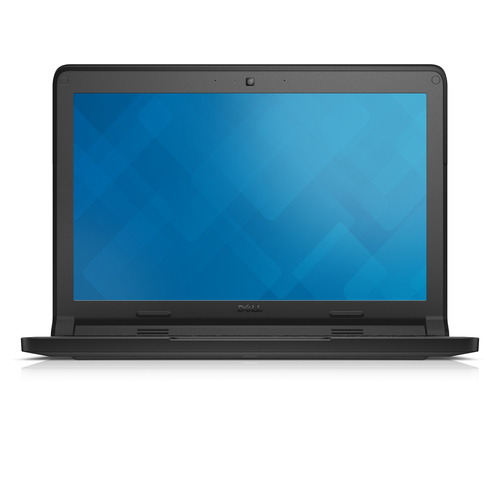
Compare DELL Chromebook 3120 reviews, specifications and available UK retailer offers. Check the details for this exact model and follow the original critics’ findings.
Manufacturer code3120-8531
The product, explained
DELL 3120-8531 is listed in the laptops category. The recorded specifications include display diagonal: 29.5 cm (11.6"); processor family: Intel® Celeron®; internal memory: 4 GB; total storage capacity: 16 GB. This entry covers manufacturer code 3120-8531. Specifications relate to this exact source record; other editions or packages may differ.
The 29.5 cm (11.6") display is specified at 1366 x 768 pixels. Consider these together: a larger screen provides more physical space, while resolution determines the number of pixels available. Neither specification establishes brightness, colour accuracy or motion quality.
This configuration lists 4 GB of memory and 16 GB of storage. Memory supports active applications; storage holds software and files. Check upgradeability separately, because a capacity figure does not establish whether either component can be replaced.
Make it work for you
Write down required apps, external displays and accessories.
Check operating-system support and upgrade policy for the planned ownership period.
Compare keyboard, webcam, screen finish and ports in person where possible.
Verify each USB-C port for charging, display and data functions.
Independent perspectives
Independent ratings, converted to the same five-point scale. Each card links to the original review and identifies the available evidence.
No scored critic reviews have been imported for this exact product yet. It remains unrated.
Independent reviews, made comparable
One consistent scale makes different publishers’ ratings easier to compare. The original review still tells you why a critic reached that verdict.
Read our scoring methodology →Scale conversion · example
An illustration of conversion, not this product’s rating.
Identify the exact model and the version reviewed. Check the manufacturer code, configuration and supplied accessories.
Convert usable ratings to five points, count each publisher once and give each critic equal weight.
Show the average to two decimal places after three distinct critics. Otherwise display tbd, keeping individual reviews visible.
Find the best fit by considering the score alongside the critic count, review dates, tested version and the strengths that matter to you. Eligible model-level reviews identify the tested configuration. Reviews of different hardware are shown separately and do not enter this product’s COR Score.
Know exactly what you’re buying
Manufacturer code: 3120-8531 · Icecat product 27120716 · Checked 16 Sep 2026. Specifications belong to this exact model.
The main features to compare for this exact model. Missing details are not assumed.
| Screen size | 29.5 cm (11.6") |
|---|---|
| Screen resolution | 1366 x 768 pixels |
| Processor family | Intel® Celeron® |
| Processor model | N2840 |
| Memory (RAM) | 4 GB |
| Total storage capacity | 16 GB |
| Storage media | Flash |
| Operating system installed | ChromeOS |
| Discrete graphics card model | Not available |
| Weight | 1.35 kg |
Open a section for the details that matter to you.
| Audio system | HD |
|---|---|
| Number of built-in speakers | 2 |
| Built-in microphone | Yes |
| Microphone in | No |
| Intel® High Definition Audio (Intel® HD Audio) | No |
| Height (rear) | 2.1 cm |
| Touchscreen | Yes |
|---|---|
| Display surface | Gloss |
| Display brightness | 220 cd/m² |
| Intel Dual Display Capable Technology | No |
| Processor manufacturer | Intel |
|---|---|
| Processor cores | 2 |
| Processor threads | 2 |
| Processor boost frequency | 2.58 GHz |
| Processor frequency | 2.16 GHz |
| Processor cache | 1 MB |
| Processor cache type | L2 |
| Processor socket | BGA 1170 |
| Processor lithography | 22 nm |
| Processor operating modes | 32-bit, 64-bit |
| Processor series | Intel Celeron Processor N2000 Series for Mobile |
| Processor codename | Bay Trail |
| ECC supported by processor | No |
| Internal memory type | DDR3L-SDRAM |
| Memory clock speed | 1333 MHz |
| Memory layout (slots x size) | 1 x 4 GB |
| Maximum internal memory | 4 GB |
| Card reader integrated | Yes |
| Compatible memory cards | SD |
| On-board graphics card | Yes |
| Discrete graphics card | No |
| On-board graphics card family | Intel® HD Graphics |
| On-board graphics card model | Intel® HD Graphics |
| On-board graphics card base frequency | 311 MHz |
| On-board graphics card burst frequency | 792 MHz |
| On-board graphics card dynamic frequency (max) | 792 MHz |
| Intel® Matrix Storage Technology (Intel® MST) | No |
| Processor package size | 25 x 27 mm |
| Processor code | SR1YJ |
| Graphics & IMC lithography | 22 nm |
| Intel Rapid Storage Technology | No |
| Processor ARK ID | 82103 |
| Conflict-Free processor | Yes |
| Storage temperature (T-T) | -40 - 70 °C |
| Storage relative humidity (H-H) | 10 - 95% |
| Front camera | Yes |
|---|---|
| Front camera resolution (numeric) | 0.92 MP |
| Front camera resolution | 1280 x 720 pixels |
| Video capturing speed | 30 fps |
| Intel® Clear Video HD Technology (Intel® CVT HD) | No |
| Intel Clear Video Technology | No |
| Intel® Quick Sync Video Technology | Yes |
| Intel® Clear Video Technology for Mobile Internet Devices (Intel CVT for MID) | No |
| Wi-Fi | Yes |
|---|---|
| Wi-Fi standards | Wi-Fi 5 (802.11ac) |
| Ethernet LAN | No |
| Bluetooth | Yes |
| Bluetooth version | 4.0 |
| USB 2.0 ports quantity | 1 |
| USB 3.2 Gen 1 (3.1 Gen 1) Type-A ports quantity | 1 |
| HDMI ports | 1 |
| HDMI version | 1.4a |
| DVI port | No |
| S/PDIF out port | No |
| Combo headphone/mic port | Yes |
| Docking connector | No |
| Total number of SATA connectors | 2 |
| Intel® Wireless Display (Intel® WiDi) | Yes |
| DC-in jack | Yes |
| Battery technology | Lithium-Ion (Li-Ion) |
|---|---|
| Number of battery cells | 3 |
| Battery capacity | 43 Wh |
| AC adapter power | 65 W |
| AC adapter frequency | 50 Hz |
| AC adapter input voltage | 100 - 240 V |
| AC adapter output current | 6.67 A |
| AC adapter output voltage | 19.5 V |
| AC adapter included | Yes |
| SmartCard slot | No |
|---|---|
| Intel Smart Connect Technology | Yes |
| Intel® Smart Response Technology | No |
| Intel Smart Connect Technology version | 1.00 |
| Operating temperature (T-T) | 0 - 40 °C |
| Product type | Chromebook |
|---|---|
| Product colour | Black |
| Form factor | Clamshell |
| Thermal Design Power (TDP) | 7.5 W |
| Scenario Design Power (SDP) | 4.5 W |
| Intel® Identity Protection Technology (Intel® IPT) | No |
| Width | 297 mm |
| Depth | 217 mm |
| Height (front) | 2 cm |
| Market positioning | Educational |
|---|---|
| LED backlight | Yes |
| Native aspect ratio | 16:9 |
| FSB Parity | No |
| Stepping | C0 |
| Tjunction | 100 °C |
| Maximum number of PCI Express lanes | 4 |
| PCI Express slots version | 2.0 |
| PCI Express configurations | 1x4 |
| Flash memory | 16 GB |
| Optical drive type | No |
| LightScribe | No |
| ExpressCard slot | No |
| CardBus PCMCIA slot type | No |
| Pointing device | Touchpad |
| Numeric keypad | No |
| Spill-resistant keyboard | Yes |
| Intel® My WiFi Technology (Intel® MWT) | No |
| Intel® Anti-Theft Technology (Intel® AT) | No |
| Intel® Rapid Start Technology | No |
| Intel® Hyper Threading Technology (Intel® HT Technology) | No |
| Intel® Turbo Boost Technology | No |
| Intel® Small Business Advantage (Intel® SBA) | No |
| Intel® Active Management Technology (Intel® AMT) | No |
| Intel® Virtualization Technology (Intel® VT) | VT-x |
| Enhanced Intel SpeedStep Technology | Yes |
| Intel® InTru™ 3D Technology | No |
| Intel® Insider™ | No |
| Intel Flex Memory Access | No |
| Intel® AES New Instructions (Intel® AES-NI) | No |
| Intel Trusted Execution Technology | No |
| Intel Enhanced Halt State | Yes |
| Intel VT-x with Extended Page Tables (EPT) | No |
| Intel Demand Based Switching | No |
| Intel® Secure Key | Yes |
| Intel 64 | Yes |
| Execute Disable Bit | Yes |
| Idle States | Yes |
| Thermal Monitoring Technologies | No |
| CPU configuration (max) | 1 |
| Embedded options available | No |
| Intel Virtualization Technology for Directed I/O (VT-d) | No |
| Intel Secure Key Technology version | 1.00 |
| Intel Virtualization Technology (VT-x) | Yes |
| Intel FDI Technology | No |
| Intel Fast Memory Access | No |
| Cable lock slot | Yes |
| Cable lock slot type | Kensington |
| Operating relative humidity (H-H) | 10 - 90% |
| Power cord included | Yes |
| Manual | Yes |
|---|
Specifications describe the supplied product data, not measured review results. Battery life, range and performance figures are source claims and can vary with use.
Build your shortlist
More products in this category. Compare their exact features, original reviews and available offers alongside the DELL Chromebook 3120.
| Product | Brand | Shown model | COR Score |
|---|---|---|---|
| DELL Pro 15 Essential PV15255 reviews → | DELL | 59V67512 GB · 8 GB RAM · 7520U · Wi-Fi · Black · UK English keyboard | tbd0 critic reviews · Available after 3 |
| DELL Pro Max 16 MC16250 reviews → | DELL | PH9MC1 TB · 32 GB RAM · 265H · Wi-Fi · Black · UK English keyboard | tbd0 critic reviews · Available after 3 |
| Acer CP311-2HN-C2GR reviews → | Acer | NX.HKLEK.00164 GB · 4 GB RAM · N4000 · Wi-Fi · Silver · UK English keyboard | tbd0 critic reviews · Available after 3 |
| Acer Nitro 5 AN515-58 Gaming Laptop - Intel Core i7-12650H, 16GB, 512GB SSD, NVIDIA GeForce RTX 4050 6G, 15.6" FHD IPS 144Hz, Windows 11, Bl reviews → | Acer | NH.QLZEK.00F512 GB · 16 GB RAM · i7-12650H · Wi-Fi · Black · UK English keyboard | tbd0 critic reviews · Available after 3 |
Your questions, answered
No scored critic reviews have been imported for this product yet. This means review coverage is missing; it does not mean the product received a poor review.
The COR Score is tbd. We publish a combined score only after at least three distinct critics have usable ratings. Any individual reviews already available remain visible.
This page identifies DELL Chromebook 3120 using manufacturer code 3120-8531. Check that code, configuration and supplied accessories against the retailer listing. Related-version reviews are labelled separately and do not contribute to this version’s score.
The source specification records display diagonal as 29.5 cm (11.6"). This is a specification, not an independent performance measurement. Check the exact model and the original critic reviews for real-world results.
The source specification records display resolution as 1366 x 768 pixels. This is a specification, not an independent performance measurement. Check the exact model and the original critic reviews for real-world results.
Use the retailer-offer section on this page for available matched offers. If no offer is shown, we do not currently have a verified price. Confirm model, stock, delivery and the final total at the retailer; coverage does not include every seller.
It depends on apps and multitasking. Check software requirements and buy enough headroom because many laptops do not allow later memory upgrades.
Sometimes, but capabilities vary. Confirm charging, display and data support for the laptop, dock, cable and monitor.
Yes. They can affect security, compatibility and the usable life of a computer. Check manufacturer and operating-system support information.
Use the recorded features to check compatibility and make a shortlist. Read the original reviews for measured performance, everyday use and the tested configuration.
Understand your options
Explore one topic in depth before making your shortlist.
Start with the complete buying guide →Related categories