
Estimate everyday printing
Estimate normal monthly pages, colour use, scans and paper sizes.
Expert reviews. One COR Score.
Brand: HP· More HP printers reviews →
Historic — Current UK availability not confirmed. Reviews and specifications remain available. Browse current products →
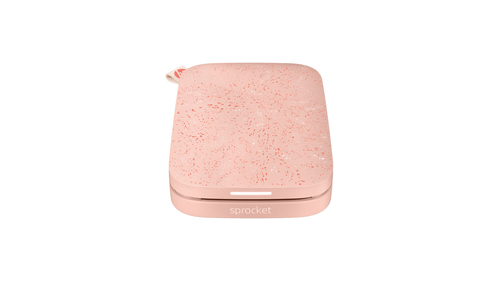
Compare HP Sprocket Photo Wireless Color Printer reviews, specifications and available UK retailer offers. Check the details for this exact model and follow the original critics’ findings.
Manufacturer codeZ9L27A
The product, explained
HP Z9L27A is listed in the photo printers category. The recorded specifications include print technology: ZINK (Zero ink). This entry covers manufacturer code Z9L27A. Specifications relate to this exact source record; other editions or packages may differ.
The listed print technology is ZINK (Zero ink). Compare replacement consumable prices and expected page volumes alongside the purchase price. Features such as duplex printing or a scanner should be confirmed independently in the specification table.
Make it work for you
Estimate normal monthly pages, colour use, scans and paper sizes.
Price current replacement ink or toner by exact part number.
Confirm duplex printing, duplex scanning and document feeder separately.
Measure the printer with trays and lid open.
Independent perspectives
Independent ratings, converted to the same five-point scale. Each card links to the original review and identifies the available evidence.
Original rating: 4 / 5
Reviewed model: HP Sprocket. Colour and included accessories may differ from this listing.
Read the full review ↗Checked 9 Nov 2026
Original rating: 3.5 / 5
Reviewed model: HP Sprocket. Colour and included accessories may differ from this listing.
Read the full review ↗Checked 11 Nov 2026
Publisher rating supplied by Icecat: 72%
ZINK technology means no ink so the shiny white paper looks just like ordinary photo paper used in standard printers but of course it is not.The unit is 11.5x7.5x2.2cm and it weighs 183 grams. It has an internal battery that is recharged by supplied mic...
Supplier-linked review for HP Z9L27A. Check the original for the tested configuration.
Read the full review ↗Excerpt and rating supplied through Icecat · Checked 11 Nov 2026
Print wonderful memories instantly – HP Sprocket Select Review
By Michael Aulia. Read the publisher’s assessment of this model.
Read the full review ↗Review link · Not included in the COR Score
HP Sprocket 3×4 portable instant photo printer review
By Frank Myers. Read the publisher’s assessment of this model.
Read the full review ↗Review link · Not included in the COR Score
Independent reviews, made comparable
One consistent scale makes different publishers’ ratings easier to compare. The original review still tells you why a critic reached that verdict.
Read our scoring methodology →Scale conversion · example
An illustration of conversion, not this product’s rating.
Identify the exact model and the version reviewed. Check the manufacturer code, configuration and supplied accessories.
Convert usable ratings to five points, count each publisher once and give each critic equal weight.
Show the average to two decimal places after three distinct critics. Otherwise display tbd, keeping individual reviews visible.
Find the best fit by considering the score alongside the critic count, review dates, tested version and the strengths that matter to you. Eligible model-level reviews identify the tested configuration. Reviews of different hardware are shown separately and do not enter this product’s COR Score.
Know exactly what you’re buying
Manufacturer code: Z9L27A · Icecat product 40922759 · Checked 21 Sep 2026. Specifications belong to this exact model.
The main features to compare for this exact model. Missing details are not assumed.
| Print technology | ZINK (Zero ink) |
|---|---|
| Maximum resolution | 313 x 400 DPI |
Open a section for the details that matter to you.
| Memory (RAM) | 512 MB |
|---|---|
| Maximum internal memory | 512 MB |
| Card reader integrated | No |
| Storage temperature (T-T) | -30 - 70 °C |
| Borderless printing | Yes |
|---|---|
| Custom media sizes | 5.0 x 7.6 cm |
| Bluetooth | Yes |
|---|
| Power consumption (standby) | 0.9 W |
|---|---|
| Power supply type | Li-Polymer 7.4 V – 2 Cell, 500 mAh Internal Battery |
| Control type | Buttons |
|---|---|
| Operating temperature (T-T) | 5 - 40 °C |
| Recommended operating temperature range (T-T) | 15 - 32 °C |
| Product colour | White |
|---|---|
| Colour name | White |
| Width | 75 mm |
| Depth | 116 mm |
| Height | 23 mm |
| Weight | 172 g |
| Other operating systems supported | Android, iOS |
|---|---|
| Bundled software | iOS and Android sprocket app (ios App store, Google Play) |
| Compatible operating systems | Android: 4.4 above / iOS: 8.0 above |
| Market positioning | Home & office |
|---|---|
| HP segment | Home |
| Operating relative humidity (H-H) | 5 - 70% |
| Layers per pallet | 6 pc(s) |
| Box contents | HP Sprocket Photo Printer; Setup card; HP ZINK Sticky-Backed Photo Paper (10-sheets); Rose Gold Wallet; Photo Album; Voucher for a skin to personalise your Sprocket; Micro USB cable; Regulatory sheet |
| UNSPSC-code | 43212108 |
| Envelope feeder | No |
| Recommended humidity operating range | 5 - 70% |
| Country of origin | South Korea |
|---|---|
| Cables included | USB |
| Package width | 100 mm |
| Package depth | 185 mm |
| Package height | 145 mm |
| Package weight | 520 g |
| Harmonized System (HS) code | 8443321040 |
| Pallet gross weight | 489 kg |
| Products per pallet | 1440 pc(s) |
| Master (outer) cases per pallet layer | 240 pc(s) |
| Pallet dimensions (W x D x H) | 1100 x 1100 x 1200 mm |
| Pallet dimensions (W x D x H) (imperial) | 1099.8 x 1099.8 x 1198.9 mm (43.3 x 43.3 x 47.2") |
| Pallet weight (imperial) | 488 kg (1075.8 lbs) |
Specifications describe the supplied product data, not measured review results. Battery life, range and performance figures are source claims and can vary with use.
Build your shortlist
More products in this category. Compare their exact features, original reviews and available offers alongside the HP Sprocket Photo Wireless Color Printer.
| Product | Brand | Shown model | COR Score |
|---|---|---|---|
| HP Sprocket 3x4 reviews → | HP | HPISP3X4W | tbd0 critic reviews · Available after 3 |
| Polaroid Lab reviews → | Polaroid | 009019 | tbd1 critic reviews · Available after 3 |
| Brother HL-L5210DW reviews → | Brother | HLL5210DWRE1512 MB RAM · Black, White | tbd0 critic reviews · Available after 3 |
| Brother MFC-J6940DW reviews → | Brother | MFCJ6940DWZU1 | tbd0 critic reviews · Available after 3 |
Your questions, answered
This page currently includes 3 scored critic reviews. Each publisher counts once. Follow the review cards for the original verdict and the version that was tested.
The current COR Score is 3.70 out of 5, calculated from 3 distinct critics. Ratings are converted to a five-point scale and given equal weight; affiliate offers do not affect this calculation.
This page identifies HP Sprocket Photo Wireless Color Printer using manufacturer code Z9L27A. Check that reference, configuration and supplied accessories against the retailer listing. Related-version reviews are labelled separately and do not contribute to this version’s score.
The source specification records print technology as ZINK (Zero ink). This is a specification, not an independent performance measurement. Check the exact model and the original critic reviews for real-world results.
The source specification records maximum resolution as 313 x 400 DPI. This is a specification, not an independent performance measurement. Check the exact model and the original critic reviews for real-world results.
Use the retailer-offer section on this page for available matched offers. If no offer is shown, we do not currently have a verified price. Confirm model, stock, delivery and the final total at the retailer; coverage does not include every seller.
No. They are standardised comparison figures; actual yield depends on coverage, jobs and maintenance.
It can be safe when the printer and network are kept updated and secured. Use manufacturer setup guidance and protect the network.
No. Check the specification for both features.
Use the recorded features to check compatibility and make a shortlist. Read the original reviews for measured performance, everyday use and the tested configuration.
Understand your options
Explore one topic in depth before making your shortlist.
Start with the complete buying guide →Related categories