
Estimate everyday printing
Estimate normal monthly pages, colour use, scans and paper sizes.
Expert reviews. One COR Score.
Brand: Canon· More Canon printers reviews →
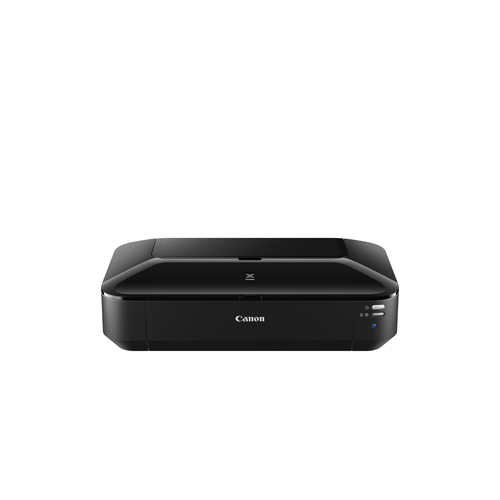
Compare Canon iX6850 reviews, specifications and available UK retailer offers. Check the details for this exact model and follow the original critics’ findings.
Manufacturer code8747B006
Specifications, review scores and prices belong to each exact model.
The product, explained
Canon 8747B006 is listed in the photo printers category. The recorded specifications include print technology: Inkjet; duplex printing: No; wi-fi: Yes. This entry covers manufacturer code 8747B006. Specifications relate to this exact source record; other editions or packages may differ.
The listed print technology is Inkjet. Compare replacement consumable prices and expected page volumes alongside the purchase price. Features such as duplex printing or a scanner should be confirmed independently in the specification table.
Make it work for you
Estimate normal monthly pages, colour use, scans and paper sizes.
Price current replacement ink or toner by exact part number.
Confirm duplex printing, duplex scanning and document feeder separately.
Measure the printer with trays and lid open.
Independent perspectives
Independent ratings, converted to the same five-point scale. Each card links to the original review and identifies the available evidence.
Original rating: 3 / 5
Reviewed model: Canon PIXMA iX6850. Colour and included accessories may differ from this listing.
Read the full review ↗Checked 10 Oct 2026
Original rating: 4 / 5
Reviewed model: Canon PIXMA iX6850. Colour and included accessories may differ from this listing.
Read the full review ↗Checked 10 Oct 2026
Original rating: 4 / 5
Reviewed model: Canon PIXMA iX6850. Colour and included accessories may differ from this listing.
Read the full review ↗Checked 10 Oct 2026
These options have different or unconfirmed specifications. Their reviews are available on the linked pages and do not count towards this product’s COR Score.
Canon PIXMA iX6850 Printer Review
By Jon. Read the publisher’s assessment of this model.
Read the full review ↗Review link · Not included in the COR Score
Independent reviews, made comparable
One consistent scale makes different publishers’ ratings easier to compare. The original review still tells you why a critic reached that verdict.
Read our scoring methodology →Scale conversion · example
An illustration of conversion, not this product’s rating.
Identify the exact model and the version reviewed. Check the manufacturer code, configuration and supplied accessories.
Convert usable ratings to five points, count each publisher once and give each critic equal weight.
Show the average to two decimal places after three distinct critics. Otherwise display tbd, keeping individual reviews visible.
Find the best fit by considering the score alongside the critic count, review dates, tested version and the strengths that matter to you. Eligible model-level reviews identify the tested configuration. Reviews of different hardware are shown separately and do not enter this product’s COR Score.
Know exactly what you’re buying
Manufacturer code: 8747B006 · Icecat product 21542426 · Checked 21 Sep 2026. Specifications belong to this exact model.
The main features to compare for this exact model. Missing details are not assumed.
| Print technology | Inkjet |
|---|---|
| Maximum resolution | 9600 x 2400 DPI |
| Duplex printing | No |
| Wi-Fi | Yes |
| Ethernet LAN | Yes |
Open a section for the details that matter to you.
| Built-in display | No |
|---|
| Card reader integrated | No |
|---|
| Borderless printing | Yes |
|---|---|
| Print speed (10x15 cm) | 36 s |
| Print speed (ISO/IEC 24734) mono | 14.5 ipm |
| Print speed (ISO/IEC 24734) colour | 10.4 ipm |
| Number of print cartridges | 5 |
| Printing colours | Black, Cyan, Magenta, Pigment black, Yellow |
| Number of printing colours | 5 |
| Maximum print size | A3+ (330 x 483 mm) |
| Paper tray media types | Envelopes, Glossy paper, High resolution paper, Matte paper, Photo paper, Plain paper, Semi-glossy paper |
| Non-ISO print media sizes | Legal, Letter |
| Borderless printing media sizes | 10x15, A3, A3+, A4, Letter |
| Sound pressure level (printing) | 44 dB |
| Power consumption (printing) | 24 W |
| Maximum input capacity (photo paper) | 20 sheets |
| USB port | Yes |
|---|---|
| USB 2.0 ports quantity | 1 |
| Bluetooth | No |
| Power source | AC |
|---|---|
| Power consumption (standby) | 2 W |
| Power consumption (sleep) | 0.3 W |
| Power consumption (off) | 0.3 W |
| AC input voltage | 100 - 240 V |
| AC input frequency | 50 - 60 Hz |
| SmartCard slot | No |
|---|---|
| Operating temperature (T-T) | 15 - 30 °C |
| Product colour | Black |
|---|---|
| Width | 584 mm |
| Depth | 310 mm |
| Height | 159 mm |
| Weight | 8.1 kg |
| Windows operating systems supported | Windows 7 Enterprise, Windows 7 Enterprise x64, Windows 7 Home Basic, Windows 7 Home Basic x64, Windows 7 Home Premium, Windows 7 Home Premium x64, Windows 7 Professional, Windows 7 Professional x64, Windows 7 Starter, Windows 7 Starter x64, Windows 7 Ultimate, Windows 7 Ultimate x64, Windows 8, Windows 8 Enterprise, Windows 8 Enterprise x64, Windows 8 Pro, Windows 8 Pro x64, Windows 8 x64, Windows 8.1, Windows 8.1 Enterprise, Windows 8.1 Enterprise x64, Windows 8.1 Pro, Windows 8.1 Pro x64, Win |
|---|---|
| Mac operating systems supported | Mac OS X 10.6 Snow Leopard, Mac OS X 10.7 Lion, Mac OS X 10.8 Mountain Lion, Mac OS X 10.9 Mavericks |
| Other operating systems supported | Android, iOS |
| Bundled software | Printer driver My Image Garden Quick Menu Easy-WebPrint EX |
| Mac compatibility | Yes |
| Market positioning | Home & office |
|---|---|
| Maximum duty cycle | 12000 pages per month |
| Maximum input capacity | 150 sheets |
| ISO A-series sizes (A0...A9) | A3, A4, A5 |
| ISO B-series sizes (B0...B9) | B4, B5 |
| Envelopes sizes | 10, DL |
| Photo stickers | Yes |
| Operating relative humidity (H-H) | 10 - 80% |
| Drivers included | Yes |
| LED indicators | Yes |
| Harmonized System (HS) code | 84433210 |
|---|
Specifications describe the supplied product data, not measured review results. Battery life, range and performance figures are source claims and can vary with use.
Build your shortlist
More products in this category. Compare their exact features, original reviews and available offers alongside the Canon iX6850.
| Product | Brand | Shown model | COR Score |
|---|---|---|---|
| Canon MAXIFY GX1051 with 3 extra black ink bottles reviews → | Canon | 6169C032 | tbd0 critic reviews · Available after 3 |
| Fujifilm Instax Square Link - Midnight Green reviews → | Fujifilm | 16785482Midnight Green | 4.17/53 critic reviews |
| Fujifilm Instax Link Wide - Mocha Gray reviews → | Fujifilm | 16719586 | tbd2 critic reviews · Available after 3 |
| Fujifilm Instax Mini Link 3 - Pink reviews → | Fujifilm | 16832118 | tbd2 critic reviews · Available after 3 |
Your questions, answered
This page currently includes 3 scored critic reviews. Each publisher counts once. Follow the review cards for the original verdict and the version that was tested.
The current COR Score is 3.67 out of 5, calculated from 3 distinct critics. Ratings are converted to a five-point scale and given equal weight; affiliate offers do not affect this calculation.
This page identifies Canon iX6850 using manufacturer code 8747B006. Check that code, configuration and supplied accessories against the retailer listing. Related-version reviews are labelled separately and do not contribute to this version’s score.
The source specification records print technology as Inkjet. This is a specification, not an independent performance measurement. Check the exact model and the original critic reviews for real-world results.
The source specification records maximum resolution as 9600 x 2400 DPI. This is a specification, not an independent performance measurement. Check the exact model and the original critic reviews for real-world results.
Use the retailer-offer section on this page for available matched offers. If no offer is shown, we do not currently have a verified price. Confirm model, stock, delivery and the final total at the retailer; coverage does not include every seller.
No. They are standardised comparison figures; actual yield depends on coverage, jobs and maintenance.
It can be safe when the printer and network are kept updated and secured. Use manufacturer setup guidance and protect the network.
No. Check the specification for both features.
Use the recorded features to check compatibility and make a shortlist. Read the original reviews for measured performance, everyday use and the tested configuration.
Understand your options
Explore one topic in depth before making your shortlist.
Start with the complete buying guide →Related categories