
Measure desk viewing space
Measure desk depth, viewing distance and arm clearance.
Expert reviews. One COR Score.
Brand: ASUS· More ASUS monitors reviews →
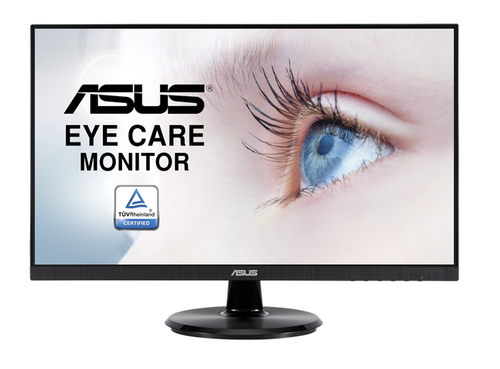
Compare ASUS VA24DQ reviews, specifications and available UK retailer offers. Check the details for this exact model and follow the original critics’ findings.
Manufacturer code90LM054S-B01370
Specifications, review scores and prices belong to each exact model.
The product, explained
ASUS 90LM054S-B01370 is listed in the computer monitors category. The recorded specifications include display diagonal: 60.5 cm (23.8"); display resolution: 1920 x 1080 pixels; panel type: IPS; maximum refresh rate: 75 Hz. This entry covers manufacturer code 90LM054S-B01370. Specifications relate to this exact source record; other editions or packages may differ.
The 60.5 cm (23.8") display is specified at 1920 x 1080 pixels. Consider these together: a larger screen provides more physical space, while resolution determines the number of pixels available. Neither specification establishes brightness, colour accuracy or motion quality.
The listed maximum refresh rate is 75 Hz. To use it, the source device, cable, resolution and input must all support the intended mode. Refresh rate is separate from response time and input lag.
Make it work for you
Measure desk depth, viewing distance and arm clearance.
Check computer output, monitor input, cable and dock as one chain.
Choose a stand or arm with the adjustment you actually need.
Use independent tests for brightness, uniformity, text and motion.
Independent perspectives
Independent ratings, converted to the same five-point scale. Each card links to the original review and identifies the available evidence.
Original rating: 3.8 / 5
Review covers ASUS VA24DQ. The verified product-data labels bind this public model name to code 90LM054S-B01370, and the original publisher article independently supplies the editorial score. This is not proof that the supplier supplied this review URL, or that the reviewer tested this colour or included accessories.
Read the full review ↗Checked 30 Sep 2026
Independent reviews, made comparable
One consistent scale makes different publishers’ ratings easier to compare. The original review still tells you why a critic reached that verdict.
Read our scoring methodology →Scale conversion · example
An illustration of conversion, not this product’s rating.
Identify the exact model and the version reviewed. Check the manufacturer code, configuration and supplied accessories.
Convert usable ratings to five points, count each publisher once and give each critic equal weight.
Show the average to two decimal places after three distinct critics. Otherwise display tbd, keeping individual reviews visible.
Find the best fit by considering the score alongside the critic count, review dates, tested version and the strengths that matter to you. Eligible model-level reviews identify the tested configuration. Reviews of different hardware are shown separately and do not enter this product’s COR Score.
Know exactly what you’re buying
Manufacturer code: 90LM054S-B01370 · Icecat product 100702065 · Checked 16 Sep 2026. Specifications belong to this exact model.
The main features to compare for this exact model. Missing details are not assumed.
| Screen size | 60.5 cm (23.8") |
|---|---|
| Screen resolution | 1920 x 1080 pixels |
| Panel type | IPS |
| Maximum refresh rate | 75 Hz |
| Response time | 5 ms |
| Display brightness (typical) | 250 cd/m² |
| High Dynamic Range (HDR) supported | Yes |
| HDMI ports | 1 |
| DisplayPort connections | 1 |
Open a section for the details that matter to you.
| Digital horizontal frequency | 30 - 85 kHz |
|---|---|
| Digital vertical frequency | 50 - 75 Hz |
| Number of speakers | 2 |
| Rated audio power (RMS) | 2 W |
| Built-in speakers | Yes |
| Audio input | Yes |
| Headphone out | Yes |
| Headphone outputs | 1 |
| Display technology | LED |
|---|---|
| Touchscreen | No |
| Display surface | Matt |
| Screen shape | Flat |
| Contrast ratio (typical) | 1000:1 |
| Contrast ratio (dynamic) | 100000000:1 |
| Dynamic contrast ratio marketing name | SmartContrast |
| Viewing angle, horizontal | 178° |
| Viewing angle, vertical | 178° |
| Display number of colours | 16.78 million colours |
| Native refresh rate | 60 Hz |
| Supported graphics resolutions | 1920 x 1080 (HD 1080) |
|---|
| Built-in camera | No |
|---|
| Built-in USB hub | No |
|---|---|
| VGA (D-Sub) ports quantity | 1 |
| DVI port | No |
| HDMI | Yes |
| Headphone connectivity | 3.5 mm |
| Panel mounting interface | 100 x 100 mm |
| Energy efficiency class (SDR) | C |
|---|---|
| Energy efficiency class (HDR) | Not available |
| Energy consumption (SDR) per 1000 hours | 22 kWh |
| Power consumption (typical) | 21.7 W |
| Power consumption (standby) | 0.5 W |
| Power consumption (off) | 0.3 W |
| AC input voltage | 100 - 240 V |
| AC input frequency | 50 - 60 Hz |
| Power supply type | Internal |
| Energy efficiency scale | A to G |
| Product colour | Black |
|---|---|
| Feet colour | Black |
| VESA mounting | Yes |
| Height adjustment | No |
| Width (with stand) | 540 mm |
| Depth (with stand) | 205 mm |
| Height (with stand) | 391 mm |
| Weight (with stand) | 3.63 kg |
| Width (without stand) | 540 mm |
| Depth (without stand) | 51 mm |
| Height (without stand) | 325 mm |
| Weight (without stand) | 3.34 kg |
| Certification | BSMI, CB, CCC, CU, FCC, ISO-9241-307, KCC, PSE, TCO8.0, TUV-Ergo, TUV-GS, VCCI, WEEE, WHQL (Windows 10, Windows 8.1, Windows 7), RCM, UL, TUV Flicker-free , KC , eStandby, TUV Low Blue Light, Vietnam MEPS, Australia MEPS, PC recycle, JM, CEC |
|---|
| HD type | Full HD |
|---|---|
| Native aspect ratio | 16:9 |
| Response time measurement type | GTG (Gray to Gray) |
| Pixel pitch | 0.2745 x 0.2745 mm |
| Viewable size, horizontal | 52.7 cm |
| Viewable size, vertical | 29.6 cm |
| NVIDIA G-SYNC | No |
| AMD FreeSync | Yes |
| AMD FreeSync type | FreeSync |
| VESA Adaptive Sync support | Yes |
| Flicker-free technology | Yes |
| Low Blue Light technology | Yes |
| HDCP | Yes |
| Cable lock slot | Yes |
| Cable lock slot type | Kensington |
| Tilt adjustment | Yes |
| Tilt angle range | -5 - 23° |
| Stand included | Yes |
| Quick start guide | Yes |
| Package width | 446 mm |
|---|---|
| Package depth | 606 mm |
| Package height | 148 mm |
| Package weight | 5.38 kg |
| Cables included | AC |
| Country of origin | China |
Specifications describe the supplied product data, not measured review results. Battery life, range and performance figures are source claims and can vary with use.
Build your shortlist
More products in this category. Compare their exact features, original reviews and available offers alongside the ASUS VA24DQ.
| Product | Brand | Shown model | COR Score |
|---|---|---|---|
| Acer Nitro VG272UV3 gaming monitor - 27", Quad HD, 180Hz, 0.5ms, FreeSync Premium, DisplayHDR 400, HDMI & DP reviews → | Acer | UM.HV2EE.30468.6 cm (27") · Black | tbd0 critic reviews · Available after 3 |
| Hannspree HP 240 WJB reviews → | Hannspree | HP240WJB60.5 cm (23.8") | tbd0 critic reviews · Available after 3 |
| Hannspree HT161HNB reviews → | Hannspree | HT161HNB39.6 cm (15.6") · Black | tbd0 critic reviews · Available after 3 |
| Hannspree HT220CUA reviews → | Hannspree | HT220CUA54.5 cm (21.4") · Black | tbd0 critic reviews · Available after 3 |
Your questions, answered
This page currently includes 1 scored critic review. Each publisher counts once. Follow the review cards for the original verdict and the version that was tested.
The COR Score is tbd. We publish a combined score only after at least three distinct critics have usable ratings. Any individual reviews already available remain visible.
This page identifies ASUS VA24DQ using manufacturer code 90LM054S-B01370. Check that code, configuration and supplied accessories against the retailer listing. Related-version reviews are labelled separately and do not contribute to this version’s score.
The source specification records display diagonal as 60.5 cm (23.8"). This is a specification, not an independent performance measurement. Check the exact model and the original critic reviews for real-world results.
The source specification records display resolution as 1920 x 1080 pixels. This is a specification, not an independent performance measurement. Check the exact model and the original critic reviews for real-world results.
Use the retailer-offer section on this page for available matched offers. If no offer is shown, we do not currently have a verified price. Confirm model, stock, delivery and the final total at the retailer; coverage does not include every seller.
It can make movement feel smoother, but benefits depend on the computer, connection and the activity.
Not necessarily. Check the laptop port supports the required display mode and charging level.
It depends on size, desk distance and use. Try it for text and multi-window work, not only video.
Use the recorded features to check compatibility and make a shortlist. Read the original reviews for measured performance, everyday use and the tested configuration.
Understand your options
Explore one topic in depth before making your shortlist.
Start with the complete buying guide →Related categories